Sales Force Automation Software for FMCG Distribution in Pakistan
Sales Force Automation Software in Pakistan, from Sabsons, connects your order bookers, supervisors, distributors, accounts team and retailers on one platform. Book orders offline at the shop, deliver them on the next visit, collect full payment, record returns with photos, and see every route live on a map. Software, devices, and support — from one company.
8 roles
Admin to Retailer
4 Android apps
Booker to Retailer
100% offline
order booking
1 workspace
per company
Why FMCG Companies Move from Paper and Spreadsheets to Sales Force Automation
Paper order books, phone calls and end-of-day spreadsheets hide the things that cost you money. Fake visits, wrong prices, unpaid deliveries, unchecked returns and commission disputes. This FMCG distribution software puts each of them under a rule the system enforces.
Visits you can trust
Check-in works only inside the outlet's geofence. Attendance needs a selfie and GPS. Supervisors see every exception.
One price, applied correctly
Prices and schemes are set centrally and applied automatically at booking, so every order carries the right price and discount.
No delivery without payment
A delivery closes only when cash or a bank transfer covers the net amount. Transfers are confirmed by your accounts team.
Returns with proof
Damaged goods are returned against the original invoice with a photo, approved by the sales manager, then inspected by QC.
Commission without arguments
Commission is worked out on net stock sold, which is delivered value minus approved returns. It is locked every month, and the booker can see it.
Shopkeepers kept informed
WhatsApp messages in English and Urdu confirm the order, announce today's delivery with a live tracking link, and confirm payment.
How Sales Force Automation Works in the Field
A simple daily cycle that every booker follows and every manager can see.
- 1
Start the day
The booker marks attendance with a selfie and GPS. Today's journey plan lists the outlets due for a visit.
- 2
Visit and book
At the shop the booker checks in inside the geofence and books the order. Schemes and discounts apply automatically, even with no internet.
- 3
Approve and load
The distributor approves the order and puts it on a load sheet for the booker's next run, issuing the stock to the van.
- 4
Deliver and collect
On the next visit the booker delivers, enters the delivered quantity and collects full payment in cash or by bank transfer. The shop gets a WhatsApp receipt.
- 5
Return and reconcile
Damaged goods are returned against the invoice with a photo. Approved returns become credit in the outlet ledger and are used on the next delivery.
- 6
Review and pay
Managers track coverage, targets, collections and commission in live dashboards and export any report to Excel or PDF.
The Complete Kit — Software, Devices, and Support from One Company
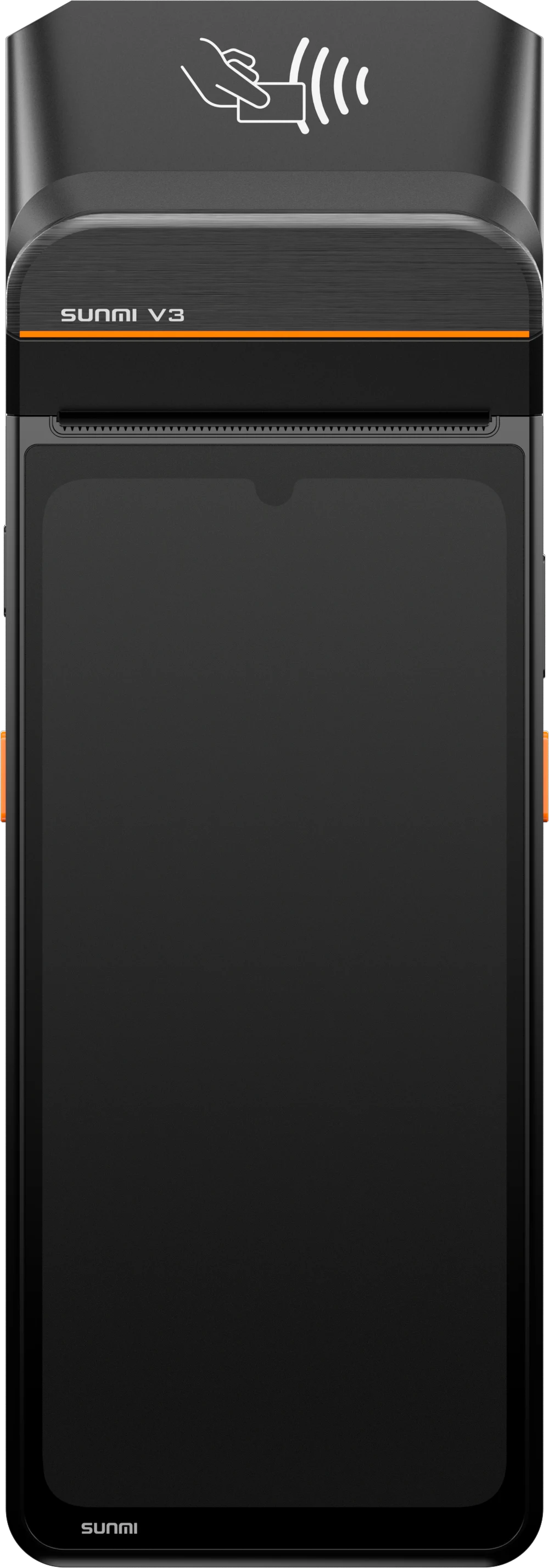
No other software vendor in Pakistan sells you the system and the hardware it runs on. Sabsons supplies the Sales Force Automation software together with the SUNMI terminals, barcode printers and scanners your field team needs, pre-configured and ready to use, with one support line for everything.
SUNMI V3 — the booker's terminal
Android handheld with a built-in printer. Book, deliver and print the invoice at the shop, on one device.
View SUNMI V3 →SUNMI V3e — the latest compact field device
The newest 3rd-gen mobile terminal for bookers who travel light. Full offline booking, GPS check-in and payment collection.
View SUNMI V3e →SUNMI 80MM Label Printer — for the warehouse
Print load sheets, invoices and labels at the distributor godown, matched to the same system.
View Label Printer →Your Shopkeepers Always Know Where Their Order Is
Shopkeepers receive WhatsApp messages in English or Urdu, through approved WhatsApp Business templates. Messages go out in the background, so the booker never has to wait for them.
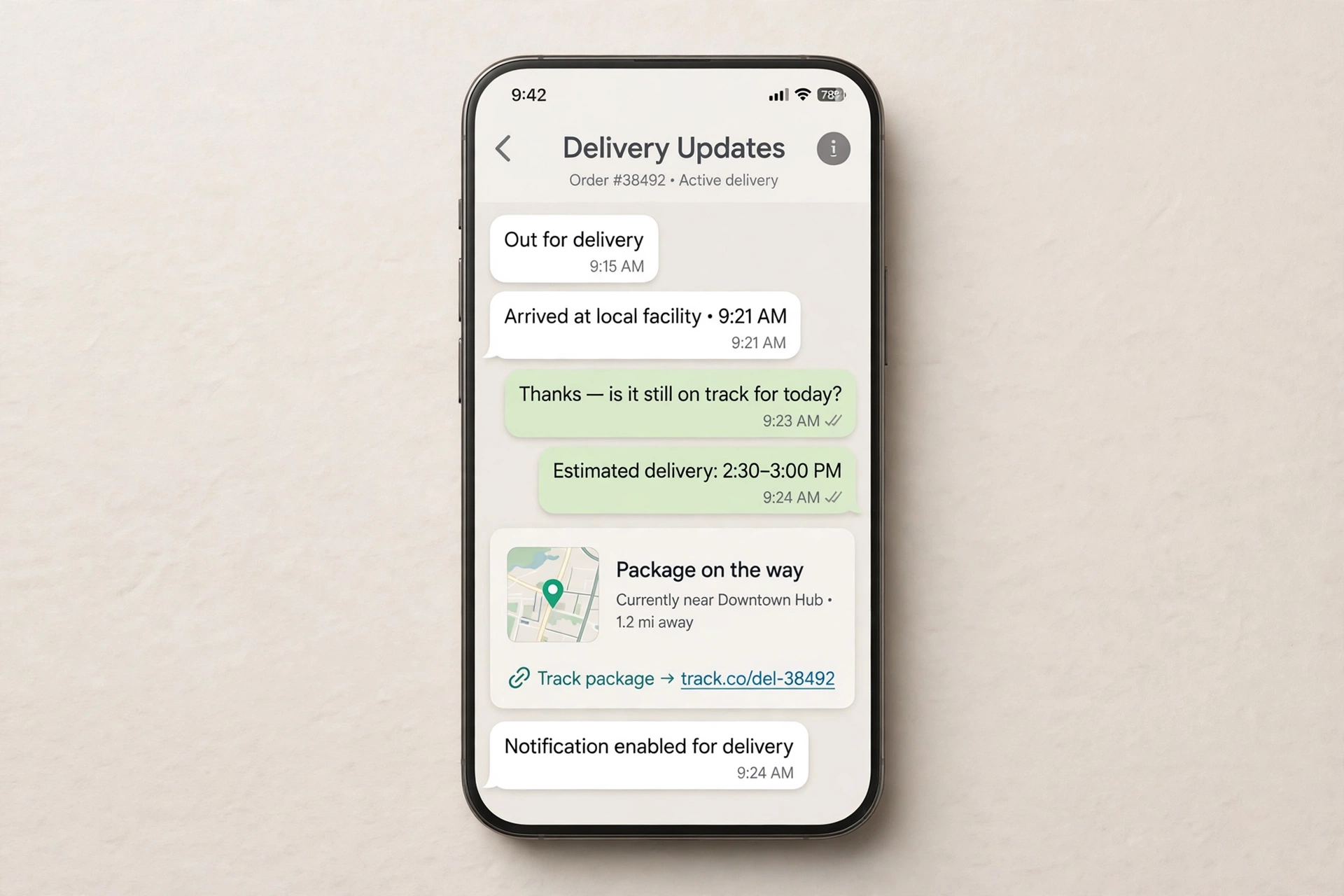
Order confirmed
Sent when the distributor approves the order.
Delivery today
Sent when the booker starts the day's run, with an expected time and a live tracking link.
Arriving soon
Sent once, when the estimated arrival drops to 10 minutes or less.
Delivered
Sent after delivery with the amount and payment mode.
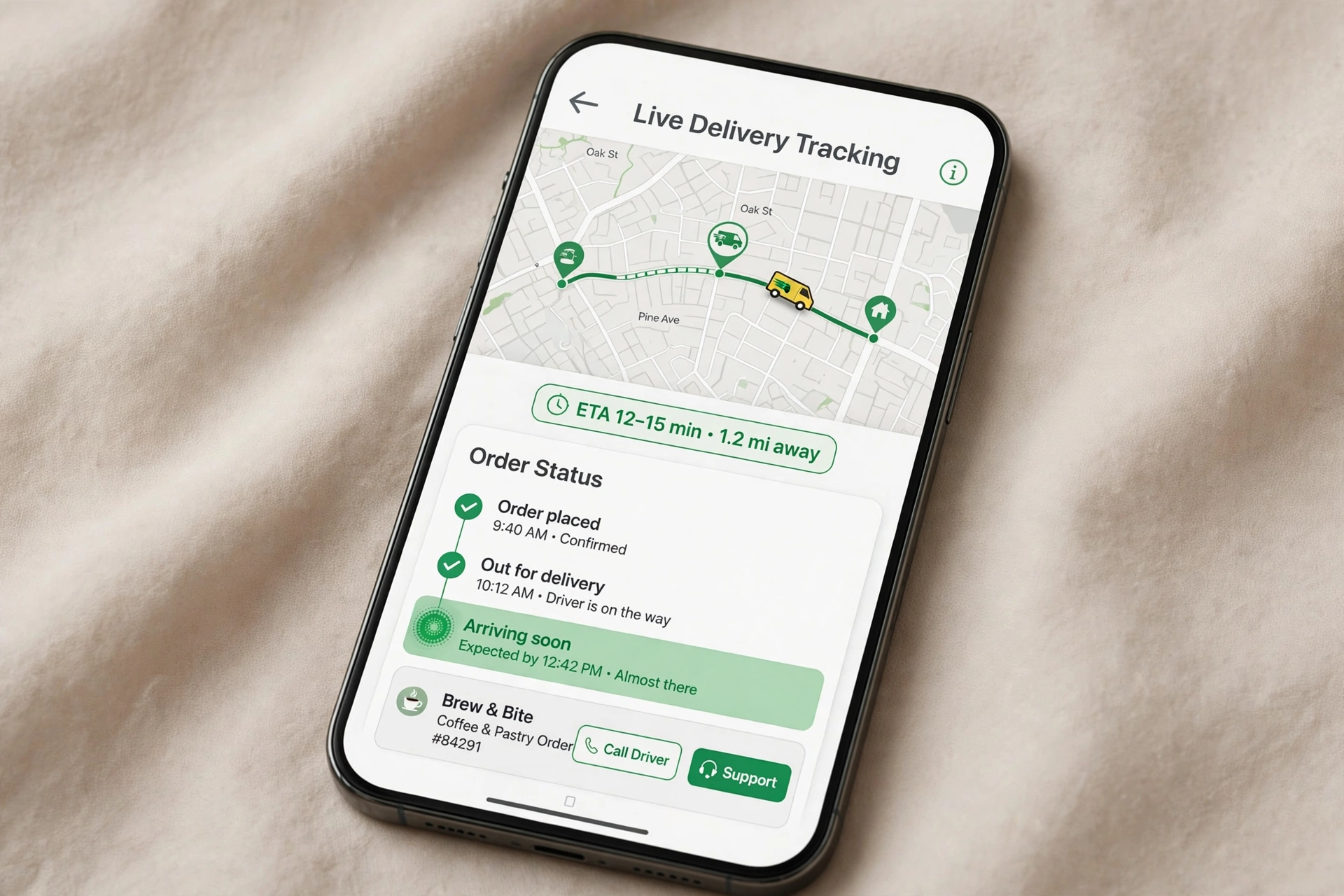
Live delivery tracking — no login, no app
The tracking link opens a public page with the booker's position, the shop and the expected arrival time, refreshed every minute. The shopkeeper opens it straight from WhatsApp — no account, no app install. The link expires at the end of the day.
Shops using the Retailer app can track the same delivery inside the app.
Everything the Order-to-Cash Cycle Needs
From the first visit to the last rupee collected — every feature your distribution business runs on.
Order booking that works without internet
Offline catalogue and cart
Products, prices and active schemes are stored on the phone. Orders are queued and sent automatically.
No duplicate orders
Every order carries a unique ID created on the phone, so a retry on a slow network never books the same order twice.
Retailer self-orders
Shopkeepers can order from the Retailer app. The order goes to their own distributor and is delivered by the booker of their route.
Cartons and pieces
Quantities are kept in pieces and shown in cartons using each product's pack size, so nobody does the arithmetic by hand.
Central prices, schemes and discounts
Price history
Each price has an effective date. Old orders keep the price they were booked at, new orders get the current one.
Three scheme types
Free goods (buy X, get Y free), percent off, and amount off, all set once by the Admin.
Applied automatically
Only schemes active on the order date apply, with optional minimum quantity. The server is the final word, so the field cannot invent a discount.
Price snapshot on every line
Unit price, scheme and discount are frozen on each order line at booking, so reports always match what the shop was charged.
Approval, load sheets and delivery
Distributor approval
The distributor approves or cancels orders from the web panel or the Distributor app, and the shop gets a WhatsApp message when its order is confirmed.
Load sheets
One load sheet per booker per day, printable as PDF, listing every order and the stock to issue to the van.
Partial delivery
The booker records the delivered quantity per line. The invoice covers only what was handed over.
Not-delivered reasons
Shop closed, payment not available, refused, out of stock or other. Undelivered orders go back on a later load sheet.
Payment collection and outlet ledger
Cash and bank transfer
Cash is confirmed on the spot. For a bank transfer the booker records the reference number and a screenshot.
Accounts confirmation
Your accounts team confirms or rejects each transfer on the web. A rejected transfer shows as due on the outlet and blocks its next delivery until cleared.
Return credit applied automatically
Net payable is the invoice minus any approved return credit the shop holds, never more than the invoice.
Outlet ledger
Every shop has a statement covering invoices, payments, return credits and adjustments. A settled outlet sits at exactly zero, so any balance is something to act on.
Returns with approval and quality control
Recorded against an invoice
The booker picks a previous invoice and its lines. The quantity cannot exceed what was delivered minus what was already returned. A photo is required.
Approved by the Sales Manager
Only the Sales Manager can approve or reject. The booker is told the outcome.
Credited to the shop
An approved return adds credit to the outlet ledger, used automatically at the next delivery.
Inspected by QC
The goods go to the distributor's damaged stock. QC confirms the damage for write-off or restores them to saleable stock.
Field control, live map and team performance
Selfie attendance
Day start and day end with a selfie and GPS location. Orders and visits open only after the day has started.
Permanent journey plan
Each route has its visit days. Today's plan lists the outlets due today, in a suggested nearest-neighbour order.
Geofenced check-in
Check-in is allowed only within the outlet's geofence (100 m by default, configurable). Outside it, the booker gives a reason and the supervisor reviews it.
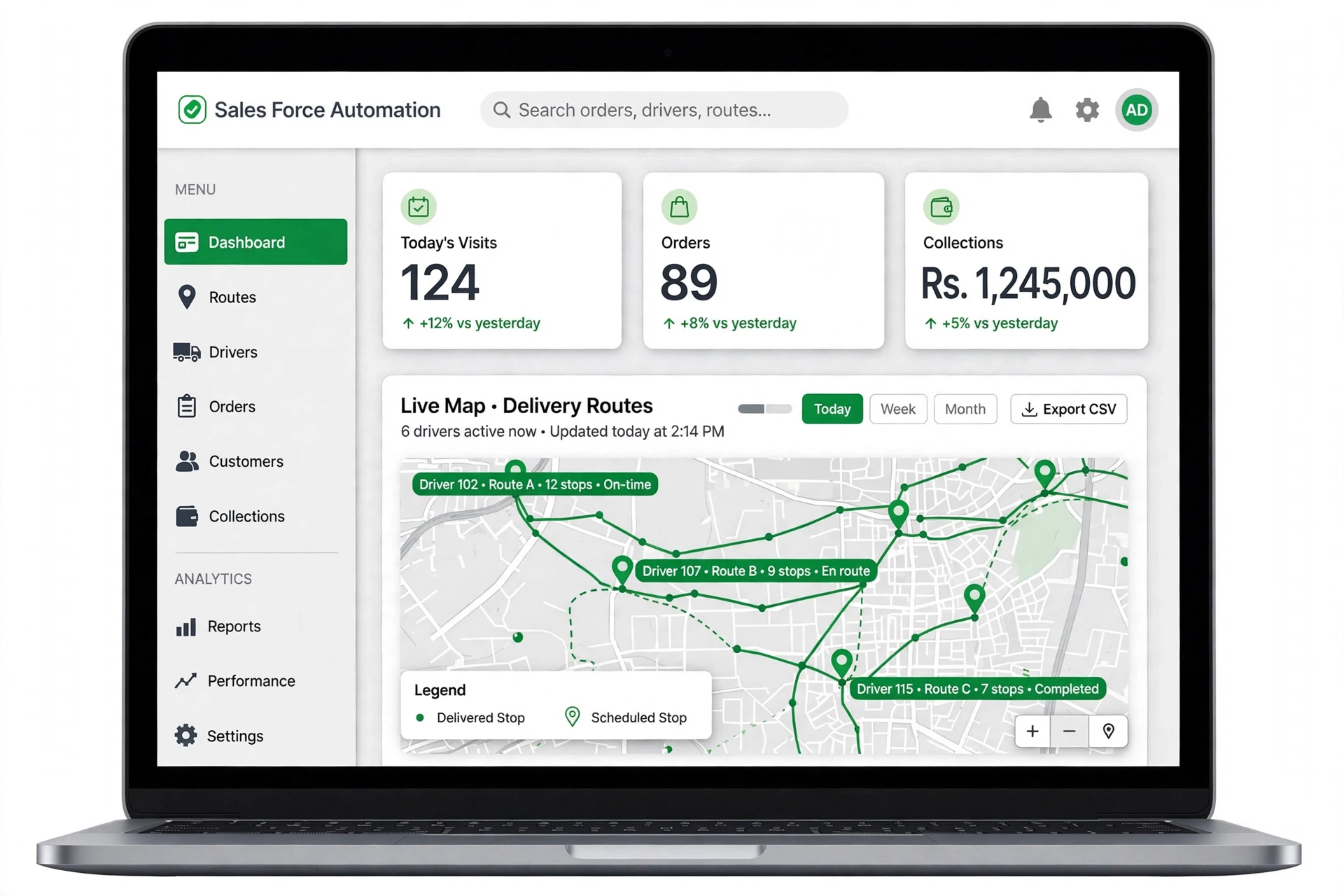
Live map, every 60 seconds
While on duty, the Booker app reports its location every 60 seconds. Supervisors see their team move on a live map with each booker's trail, and stale positions are clearly marked.
Commission, targets and reports
Commission on net sold
Delivered value minus approved returns, counted only once the payment is confirmed. Rates come from a company default with optional per-booker and per-product overrides.
Monthly lock
Each month is closed and locked. A return approved after its month is locked is deducted in the current open month, so paid figures never change.
Monthly targets
Value targets per booker, with optional quantity targets per product. Achievement uses the same net-sold figure as commission.
9 reports, Excel and PDF export
Daily sales, sales by product, booker performance, collections, returns, commission, attendance, target vs achievement and outlet ledger statement — filter by date, distributor, booker and route, then export.
Distributor stock
Stock is tracked per distributor across saleable, van, damaged and empties locations. Every movement is recorded with its reason.
Full audit trail
Every change to an order, payment, return or stock records who did it and when. Import cities, distributors, outlets and products from CSV, with a dry run that reports every skipped row.
Retail execution — more than order booking
Outlet census
Bookers add new shops with GPS and a shopfront photo. A supervisor approves them before they join a route.
Merchandising surveys
Build surveys on the web with yes/no, number, text and photo questions. They reach every booker on the next sync.
Asset tracking
Track coolers and racks by QR code, with a condition check and photo on each visit.
Complaints
Bookers and shopkeepers log complaints that move through an open, in progress and resolved workflow.
Empties
Record returnable bottles and crates collected from each outlet into the distributor's stock.
Push notifications
Bookers, supervisors, distributors and retailers get push alerts for the events that concern them, and a tap opens the right screen.
Built for Every Person in Your Distribution Chain
Each role sees only what it needs. A distributor sees only its own data, a booker only their own routes, and a retailer only their own shop.
Admin
Sets up cities, distributors, routes, products, prices, schemes, targets, commission rules and users.
Sales Manager
Approves or rejects sales returns and reads every sales report.
Supervisor
Watches bookers on a live map, checks coverage and approves new outlets and GPS overrides.
Accounts
Confirms or rejects bank transfers and reviews collections and outlet ledgers.
Quality Control
Inspects returned damaged stock and writes it off or restores it to saleable.
Distributor
Approves orders, prepares load sheets and manages its own stock and collections.
Order Booker
Visits outlets, books orders, delivers, collects payment and records returns, online or offline.
Retailer
Places self-orders, tracks delivery live and checks its own account.
Four Android Apps — One for Every Role on the Move
The Booker app, the order booking app for your field team, works fully offline in the market. The Supervisor, Distributor and Retailer apps stay online so every decision is made on live data. iOS apps are on the roadmap.
Booker app — order booking, delivery and collection
The order booker's whole day in one app. Everything is saved on the phone first and synced in the background, so a dead zone never stops a sale and a weak signal never creates a duplicate order.
- Selfie and GPS attendance, today's journey plan
- Order booking with automatic schemes
- Today's deliveries from the load sheet
- Cash or bank transfer with screenshot
- Damaged returns with photo, surveys, asset QR checks
- Targets, monthly commission and sync status
Supervisor app — your team in your pocket
Supervisors spend their day in the market too. The app shows the team on a map, sorted by what needs attention first. Who has not started the day, whose phone has stopped reporting, and who is out working.
- Team map with every booker's last position
- Visits, orders and performance for each booker today
- Approve new outlets and review GPS overrides
Distributor app — orders, load sheets, stock and money
The distributor approves orders with the same rules as the web panel and always sees current stock before issuing it.
- Orders inbox — approve or cancel
- Today's load sheet for each booker
- Saleable, damaged and van stock at a glance
- Today's collections and pending bank transfers
Retailer app — self-ordering for shopkeepers
A B2B ordering app for your retailers. Shops order between visits, and the order follows the same path as a booker's order. It goes to their distributor, onto the load sheet, and is delivered by their booker.
- Catalogue and cart with current prices and schemes
- Order timeline in plain language
- Live tracking map on delivery day
- Ledger, payments, return credit and complaints
One Platform, Many Companies — an Isolated Workspace for Every Business
Each company gets its own workspace with its own Admin, its own team, its own distributors and shops, its own products and prices. Many companies share the same reliable platform, but none of them can ever see each other's data.
Your organisation
Cities, distributors, routes and outlets, arranged the way your business is.
Your people
Every user, from your Admin to each order booker and retailer, signs in to your workspace only.
Your catalogue
Products, pack sizes, price history and schemes set by your Admin for your market.
Your rules
Commission rates, monthly targets, geofence radius and other settings chosen for your own field force.
Your customer messages
WhatsApp messages to your shops go out in your company's name, in English or Urdu.
Your records
Orders, invoices, payments, returns, stock, ledgers, photos and the audit trail, kept separate from every other company.
The server enforces this isolation on every request. It is not just a matter of hiding menu items. Files such as selfies, return photos, transfer screenshots and invoices are stored privately and opened only through signed, time-limited links. Most companies use a workspace on our cloud; if your policy requires it, the system can also run as a dedicated installation on your own server.
Frequently Asked Questions
What is sales force automation (SFA) software?
Does the Booker app work without internet?
Which devices does Sales Force Automation support?
Can more than one company use Sales Force Automation?
Can another company see our data?
How does Sales Force Automation stop fake shop visits?
Does Sales Force Automation allow credit sales?
How are bank transfers confirmed?
How are damaged returns handled?
How is booker commission calculated?
Which languages are supported?
Can shopkeepers track their delivery?
Can we import our existing data?
Can Sales Force Automation run on our own server?
How much does Sales Force Automation cost?
See Sales Force Automation Running with Your Own Products and Routes
Book a free demo. We will set up a sample workspace with your cities, distributors and products so your team can try it in the field, and we will walk you through every step until you are satisfied.
Prefer email? Write to info@sabsons.com.pk